Track a Container at Jebel Ali: Status, Terminal and Arrival
Jebel Ali Port (UN/LOCODE AEJEA) is operated by DP World and has four container terminals, T1 to T4. If you clear or move containers through it, you need three things quickly: whether the box has landed, which terminal it is at, and when its free time ends.
This guide covers where to find the container number, how to check it, what each status means, how to find the terminal, how free time works, and what to do when no record appears. For a whole manifest, use batch container tracking. To be told when a container first appears, set an arrival alert.
How to Track a Jebel Ali Container
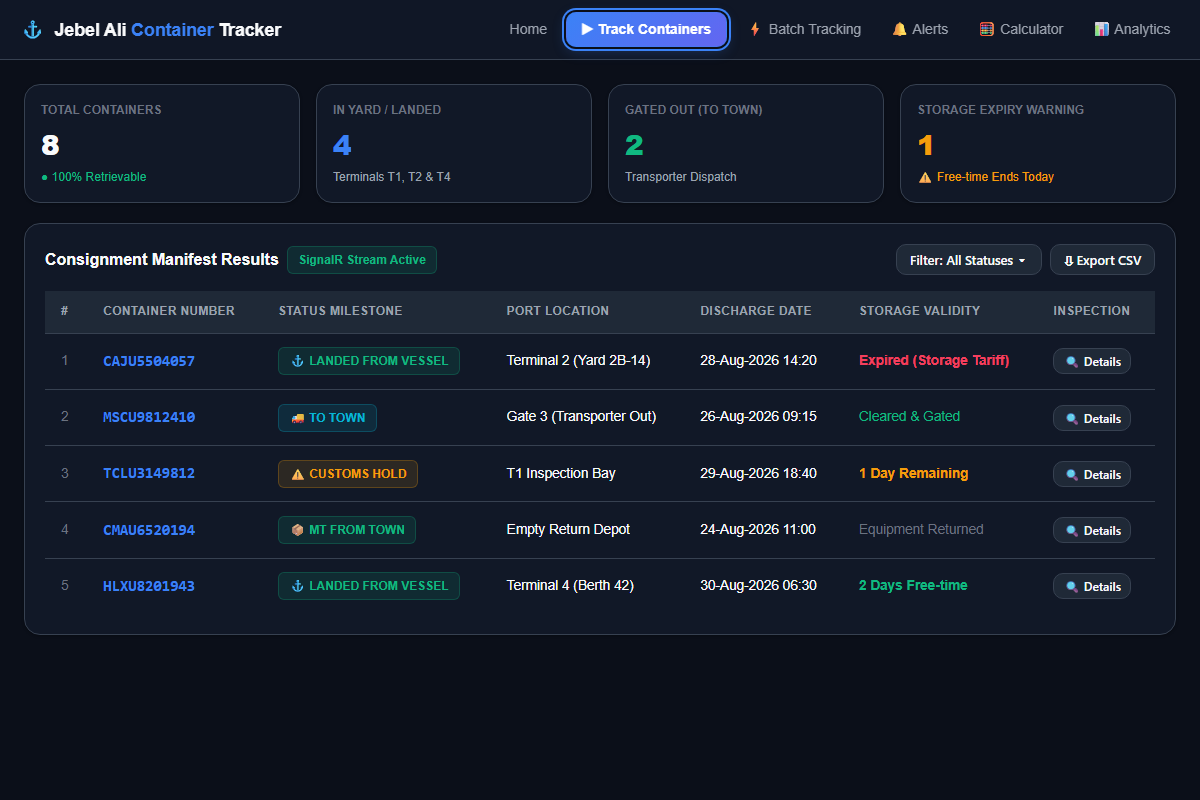
Tracking a container through Jebel Ali is straightforward when you possess the standardized 11-character equipment identification number. Whether tracking an inbound full container load (FCL), an export consignment scheduled for vessel loading, or an empty unit awaiting depot return, the operational process follows these steps:
- Retrieve Your Container Number: Locate the 11-character container number from your ocean Bill of Lading (B/L), sea waybill, commercial delivery order (DO), or shipping advisory notice.
- Enter the number: Enter the container number into the tracking search box above or open the dedicated Tracking Workspace for large shipments.
-
Review Current Port Milestone: Inspect the returned operational status (e.g.
LANDED FROM VESSEL,TO TOWN, orMT FROM TOWN). - Verify Terminal Yard Assignment: Identify which terminal complex (Terminal 1, 2, 3, or 4) currently holds the box to coordinate haulier gate appointments.
- Check Storage & Free-Time Validity: Note the recorded discharge timestamp and check your remaining free days to arrange truck collection before port storage fees accrue.
Where to find your container number
- Bill of lading (B/L) or sea waybill: in the container and seal numbers column.
- Delivery order (DO / e-DO): on the delivery release issued through Dubai Trade.
- Arrival notice or pre-alert: sent by your carrier or freight forwarder before the vessel arrives.
- The container itself: painted on the doors and roof.
Entering numbers
You don't need to format anything. Paste one number such as MSCU1234567, or up to 300 numbers separated by new lines, commas, tabs or spaces, into the tracking workspace. You can also load a .txt, .csv or .tsv file. Spaces and dashes inside numbers are cleaned up and duplicates are removed.
How to Track a Container Using the Container Number (ISO 6346 Format)
Every standardized intermodal shipping container in international maritime commerce is registered under ISO 6346. An ISO container number always consists of exactly 11 alphanumeric characters divided into four distinct components:
- Owner / Carrier Code (3 Letters): Registered with the Bureau International des Containers (BIC). For instance,
MSCUdenotes Mediterranean Shipping Company,MAEUdenotes Maersk Line,CMAUdenotes CMA CGM, andHLXUdenotes Hapag-Lloyd. - Equipment Category Identifier (1 Letter):
Udesignates freight containers;Jindicates detachable freight container-related equipment;Zdenotes road trailers and chassis. - Serial Number (6 Digits): A unique sequential number assigned by the owner to distinguish each container box within their fleet.
- Check Digit (1 Digit): A mathematically calculated checksum generated via a Modulo-11 algorithm that validates that the owner code and serial number were entered without typos.
Need to verify whether a container number check digit is valid before tracking? Use our free ISO 6346 Container Check Digit Validator →
How This Tracker Gets Its Data
Each container is looked up in publicly available Jebel Ali port records, the same information the official Container Enquiry on Dubai Trade shows. Results stream into the table as each container comes back.
The raw record is turned into a plain status (at port, to town, empty returned, not found), a terminal, vessel and voyage, move history, and dwell and free-time dates.
Results are cached so a repeat check is fast. Failed look-ups aren't cached and are retried automatically. You can refresh any single container from the workspace.
More detail is on the data & methodology page. The official record is always the one on Dubai Trade and DP World.
Jebel Ali Container Status Codes Explained
Port systems communicate container readiness through concise operational status strings. Understanding what each status means physically on the ground in Jebel Ali ensures you take the appropriate next logistics action:
What it means: The container has been physically discharged from the vessel by a gantry crane and placed in the import container yard stack.
Storage implications: The recorded discharge timestamp initiates the DP World terminal storage free-time clock (indicatively 10 days for standard import containers under the DP World tariff).
Action required: Complete your customs declaration (Mirsal 2 Bill of Entry), confirm ocean carrier delivery order (e-DO) release, and schedule a haulier e-token pickup.
What it means: The laden container has completed customs clearance, passed terminal out-gate inspection, and is travelling on a transporter chassis toward the consignee's warehouse or industrial facility.
Storage implications: Terminal port storage dwell concludes upon gate-out. However, the ocean carrier's equipment detention window is now active until the empty container is returned.
Action required: Coordinate immediate warehouse destuffing and instruct the haulier to return the empty container before carrier detention free-time expires.
What it means: The empty (MT) container has been returned by the transport driver to the designated DP World terminal yard or carrier empty depot.
Storage implications: Carrier equipment detention concludes immediately upon in-gate scanning.
Action required: Retain the gate-in Equipment Interchange Receipt (EIR) reference number to process container deposit refunds with the shipping line.
What it means: The submitted container number has no active operational record in Jebel Ali Port databases.
Common causes: The vessel is still in transit at sea, the ocean carrier has not submitted the electronic import manifest to Dubai Customs, a typographical error exists in the 11-character number, or the container discharged at another UAE port (such as Khalifa Port in Abu Dhabi).
Action required: Verify the container number format with an ISO validator, check vessel estimated arrival, or configure an Arrival Alert to be notified when port data appears.
The main milestones are explained on the Jebel Ali status page. Vessel arrival, berth and inspection holds are in the status codes guide.
What to Do When "NO DATA" Appears, and Who to Contact
- Check the number: 4 letters followed by 7 digits, for example
MSCU1234567. The ISO 6346 validator catches typos through the check digit. - Check the vessel's arrival: no port record appears until the vessel has arrived and the container has been discharged or registered.
- Check the port of discharge: make sure the B/L says Jebel Ali (AEJEA), not another UAE port such as Khalifa Port (AEKHL).
- Set an arrival alert: arrival alerts keep checking in the background and notify you once when the record appears.
- Delivery order (e-DO) release
- Freight payment and container deposits
- Demurrage and detention free time or waivers
- Vessel schedule delays
- e-token booking issues
- Port storage invoices
- Gate access problems
- EIR discrepancies
How to Find the Jebel Ali Terminal (T1, T2, T3 & T4)
Every tracking result shows the terminal holding the container. You need it to book the gate appointment (e-token) for the right terminal. Use the terminal guide for what to check at each one:
See the full Jebel Ali terminals guide (T1–T4).
How to Check Container Discharge Information
The discharge timestamp is the most critical operational data point for an inbound container. It answers when the cargo physically separated from the ocean carrier and entered UAE port territory:
- Port Storage Clock: In DP World Jebel Ali, terminal storage free time starts from the discharge timestamp, not vessel berthing.
- Customs Hold Cleared: Physical inspection cannot occur until the container has been placed into the terminal yard stack.
- Transport Dispatching: Transport coordinators use discharge confirmation to trigger driver dispatch to the terminal staging lanes.
Example: if a vessel berths on Monday morning but your container is discharged on Tuesday afternoon, free time is counted from Tuesday. To see the date, paste your container number into the Tracking Tool and check the Arrived date in the results table or the container's detail view.
How to Check Storage / Free Days & Charges
DP World allows a free storage period for import containers, counted from discharge. After that, daily storage charges apply and must be paid before gate-out. Indicative figures from the published tariff:
| Container | Free storage from discharge | Next chargeable days | Thereafter |
|---|---|---|---|
| Up to 20ft (dry or reefer) | 10 days | 82 AED/day (next 5 days) | 153 AED/day |
| Over 20ft (40ft / 40ft HC / 45ft, dry or reefer) | 10 days | 164 AED/day (next 5 days) | 306 AED/day |
| Out of gauge (OOG) up to 20ft | 10 days | 246 AED/day (next 5 days) | 459 AED/day |
| Out of gauge (OOG) over 20ft | 10 days | 492 AED/day (next 5 days) | 918 AED/day |
Indicative only. Figures are taken from the DP World UAE Region Tariff Book (November 2023 edition, effective 1 Nov 2023), item 511.1 Import full containers ↗ (reviewed 5 October 2026). Consignees importing at least 30 containers on one bill of lading or vessel voyage get 14 free days, and at least 100 containers get 20. Reefers also pay a monitoring charge of AED 155 per 24 hours. Carrier demurrage and detention are separate and set by your shipping line. Always confirm current charges with DP World UAE ↗ or on Dubai Trade ↗.
Want to calculate your estimated exposure? Use our interactive Jebel Ali Storage Calculator → or read the full Storage Charges Breakdown →
Jebel Ali Storage vs Demurrage vs Detention
One of the most expensive errors in UAE logistics is treating storage and demurrage as the same fee. They are separate charges billed by different organizations:
| Term | Meaning | Where It Applies | Billed By | Typical Trigger |
|---|---|---|---|---|
| Port Storage | Fee for physical yard space occupied inside the port terminal. | Terminal Yard (T1–T4) | DP World UAE Region | Free storage days exceeded after vessel discharge. |
| Demurrage | Fee for equipment usage while container is inside the port terminal. | Inside Port Terminal | Ocean Carrier (Shipping Line) | Carrier contractual free time exceeded before gate-out. |
| Detention | Fee for equipment retained outside the port beyond allowed turnaround. | Outside Port Terminal | Ocean Carrier (Shipping Line) | Delay in returning empty container to port or depot. |
Read our dedicated comparison: Jebel Ali Storage vs Demurrage vs Detention Guide →
Dubai Trade Container Enquiry & Relationship
Dubai Trade is the official digital Single Window platform enabling commercial trade and customs procedures across Dubai, including DP World, Dubai Customs, and JAFZA.
Official Portal vs Container Tracer:
- Dubai Trade (dubaitrade.ae): The mandatory portal for transactional clearance—filing customs declarations, paying customs duty, securing delivery orders (e-DO), and purchasing haulier appointment e-tokens.
- Container Tracer (independent, not affiliated): a free status-checking tool for batch look-ups of up to 300 containers, saved watchlists, arrival alerts, storage estimates and CSV export. No login is needed to check status.
Read our full walkthrough: Dubai Trade Container Enquiry vs Independent Tracker →
What Is an Equipment Interchange Receipt (EIR)?
An Equipment Interchange Receipt (EIR) is the legal document issued whenever a shipping container transfers custody between the terminal operator (DP World) and the road transport haulier at port gates:
- Gate-Out EIR: Issued when a laden container leaves Jebel Ali Port. Documents the departure timestamp, haulier details, tractor/chassis registration, and verified container seal number.
- Gate-In EIR: Issued when the empty container is returned to DP World or carrier empty yard. Documents the return timestamp, equipment structural condition, cleanliness, and any noted damage.
- Deposit Refund Protection: Ocean carriers require the gate-in EIR receipt before releasing container security deposits to importers.
Learn how to inspect and interpret EIR receipts: Jebel Ali EIR Guide: Equipment Interchange Receipts Explained →
Container Clearance, Customs Release & Gate-Out Process
Once a container reaches LANDED FROM VESSEL status, freight forwarders and clearing agents must complete the operational clearance sequence before dispatching hauliers:
- Electronic Delivery Order (e-DO): Obtain delivery authorization from the ocean carrier via Dubai Trade after settlement of ocean freight and destination charges.
- Dubai Customs Mirsal 2 Declaration: Submit the customs declaration, clear duty and VAT assessments, and monitor inspection flags. If selected for inspection, see Customs inspection & holds →.
- Port Charges & e-Token Appointment: Settle DP World terminal storage and handling fees, then schedule an inbound truck appointment token through Dubai Trade TAS.
- Physical Gate Out: The haulier accesses the designated terminal gate (T1–T4), takes physical delivery, and receives a stamped Gate-Out EIR.
Follow our complete operational roadmap: Jebel Ali Container Clearance & Gate-Out Checklist →
Frequently Asked Questions
How do I track a container moving through Jebel Ali?
Enter your 11-character ISO container number into the tracking search box above and click "Check Status". The system retrieves latest available port records to display the milestone status, terminal yard (T1–T4), discharge timestamp, and storage validity dates.
Can I track a container using only the container number?
Yes. You only need the 11-character ISO container number. No Bill of Lading (BL) number, booking number, or user login is required to check status.
What does LANDED FROM VESSEL mean?
LANDED FROM VESSEL indicates that your container has been physically lifted off the vessel and placed into the import container yard stack. The discharge timestamp marks the start of the port storage free-time clock.
How do I find which terminal my container is at in Jebel Ali?
When you query your container, the parsed result displays the assigned terminal (Terminal 1, Terminal 2, Terminal 3, or Terminal 4). Knowing the terminal is necessary to book the correct haulier e-token and gate lane.
What is the difference between Container Tracer and Dubai Trade?
Dubai Trade is the official single window for transactional clearance (filing customs declarations, DO releases, and token booking). Container Tracer is an independent operational utility built for fast batch inquiries, watchlists, storage estimation, and CSV exports.
Have more questions? Visit our comprehensive Jebel Ali Container FAQ Page →