Jebel Ali Container Enquiry: Official Dubai Trade Portal vs an Independent Tracker
Notice of Independence: Dubai Trade operates the official digital Single Window for trade and logistics in Dubai. Its Container Enquiry service is the official portal for single container lookups. Container Tracer is a separate, independent tool for batch status checks, saved watchlists, arrival alerts and storage estimates. Container Tracer is not affiliated with or endorsed by Dubai Trade or DP World. See our independence notice.
1. What is Dubai Trade Container Enquiry?
Dubai Trade (dubaitrade.ae) is the integrated digital platform providing access to major trade and logistics services in Dubai, including DP World container terminals (Terminal 1, 2, 3, and 4), Dubai Customs, and JAFZA economic zones.
The Container Enquiry service is an operational capability within the Dubai Trade portal that allows importers, exporters, customs brokers, and freight forwarders to look up the physical and regulatory milestone status of shipping containers moving through Jebel Ali Port.
2. What Information Does Container Enquiry Provide?
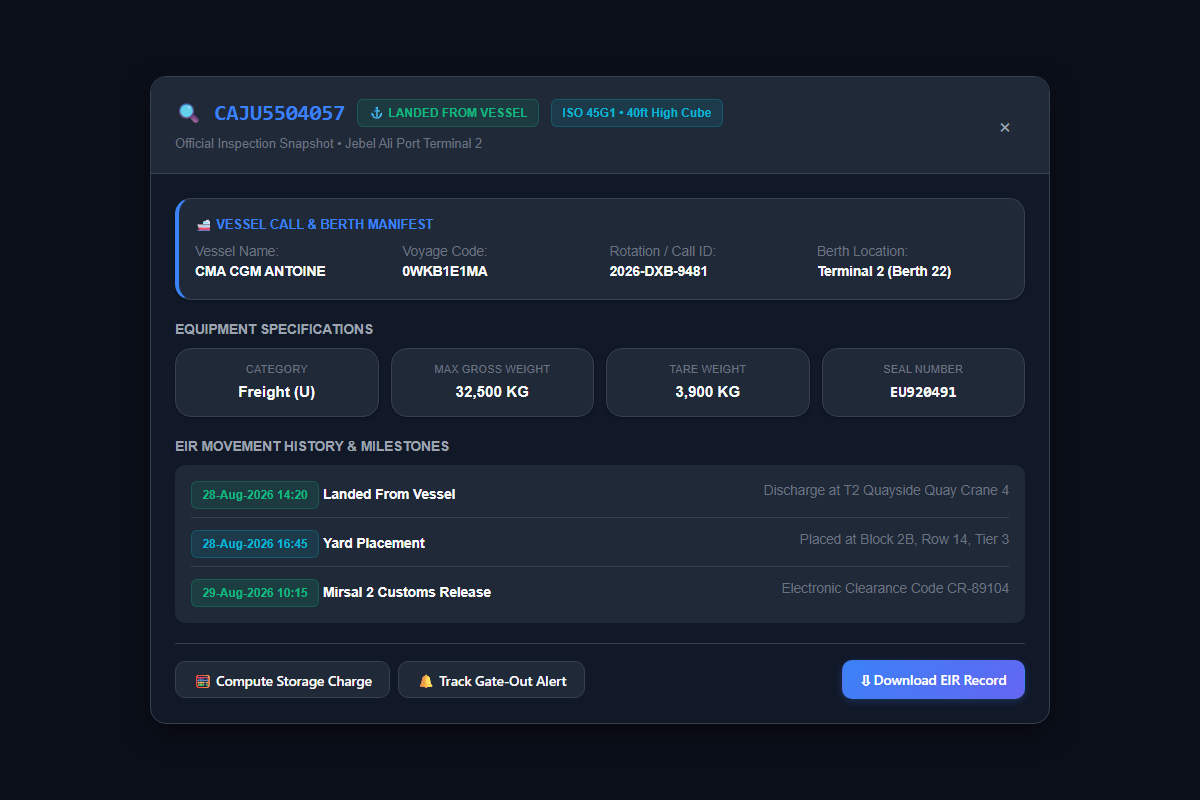
When a container inquiry is executed for a valid 11-character ISO container number, the information shown typically includes:
Vessel name, voyage number, expected or actual discharge date, and carrier booking reference.
Identifies whether cargo is at Terminal 1 (T1), Terminal 2 (T2), Terminal 3 (T3), or Terminal 4 (T4).
Discharge date, Storage Start Date, and Gate Out / Storage End Date references.
Equipment Interchange Receipts, gate pass timestamps, haulier registrations, and move codes.
3. How to Check a Container: Step-by-Step
-
Obtain your ISO 6346 Container Number: Ensure you have the full 4-letter prefix and 7-digit numerical sequence (e.g.
TEST1234567). - Option A — Use Container Tracer (Fast Batch Mode): Paste single or multiple container numbers into the search box on our Tracking Workspace. Results stream with storage timeline calculations and one-click CSV export.
-
Option B — Official Dubai Trade Portal: Navigate to
dubaitrade.ae, access Container Enquiry, input the container number, and submit the inquiry.
4. Understanding Container Statuses & "NO DATA"
Container has been physically lifted from the vessel and stacked in the terminal container yard. For terminal storage calculations, the discharge timestamp serves as the reference starting point.
Indicates that the laden container has moved out of the terminal gate for delivery. Customs clearance, delivery order release, and carrier requirements should be verified separately.
Indicates that the empty (MT) container has been returned to the DP World yard or designated container depot. Carrier detention terms should be checked separately.
Indicates that the ocean carrier manifest has not yet been registered or the vessel is still at sea. Once a record appears, the container has arrived at the port. Container Tracer offers Automated Arrival Alerts that keep checking in the background and notify you once, by email or browser notification, when the record appears.
For complete definitions of all status codes, see our Jebel Ali Container Status Codes Guide or explore Container Arrival Notifications.
5. Official Dubai Trade vs Independent Container Tracer
| Capability | Official Dubai Trade | Container Tracer |
|---|---|---|
| Single Container Tracking | Yes | Yes |
| Batch Container Tracking | Single query lookup | Yes (up to 300 containers per run, paste or file upload) |
| Saved Watchlists | Transactional session | Yes (saved in your browser, or synced across devices with a free account; highlights changes since last check) |
| CSV Report Export | Standard portal views | Yes (one-click CSV with status, terminal, vessel, arrival, free-time expiry, DO status and dwell days) |
| Storage Timeline Calculation | Milestone dates displayed | Yes (free-time expiry per container, plus an indicative storage calculator) |
| Operational Status Interpretation | Standard system codes | Yes (operational interpretations) |
| Automated Arrival Alerts | Not confirmed here. Check Dubai Trade. | Yes (background checks, one email or browser notification on arrival) |
Note: Dubai Trade remains the official platform for applicable trade, customs, and transactional services. Container Tracer provides an independent tracking-focused workflow.
Official sources
- Dubai Trade (dubaitrade.ae) ↗: Official single window: Container Enquiry, delivery orders, e-tokens and port payments.
- DP World UAE (dpworld.com/uae) ↗: Port operator for Jebel Ali terminals T1 to T4: services, notices and customer care.
- Dubai Customs (dubaicustoms.gov.ae) ↗: Customs declarations, inspection and release rules.
- Container Tracer is independent and not affiliated with any of these organisations. Always confirm rules and charges with them directly.
Track Your Jebel Ali Containers
Get status, storage validity, and terminal movement updates with our fast batch tracking tool.